Hura Product Showcase Builder: Show and Sell Your Shopify Products Everywhere (Complete Feature Guide)
Your customers don't only shop on your storefront. They read blog posts, scroll Instagram and TikTok, open newsletters, visit partner websites and scan printed flyers. Every one of those moments is a chance to sell, but only if your products are actually there, with live prices and a button to buy.
That is exactly what Hura Product Showcase Builder does. It turns your Shopify products into beautiful, shoppable widgets you can place anywhere: on any page of your Shopify store, inside blog posts, and even on websites that are not built with Shopify, such as WordPress, Blogger, Joomla, Drupal or a custom landing page.
In this guide we walk through every feature of the app, with real screenshots, so you can see how it helps you put your products everywhere and sell everywhere.
At a glance: what you get
- 3 types of product showcases: Collection, Specific products and Single product
- Embed anywhere: one code for your Shopify store, one code for any other website
- 4 layouts: Grid, List, Slider and Order form
- Full design control with a live desktop, tablet and mobile preview
- Minishop: a complete mini store with quick view, cart and checkout that you can drop onto any web page
- Direct checkout links and QR codes that send buyers straight to a pre-filled checkout
- 11 ready-made theme sections for Online Store 2.0 themes
- Analytics for every showcase: views, clicks, click-through rate and top countries
- AI tools that write blog posts and create TikTok and Instagram content from your products
1. Three showcase types for every selling situation
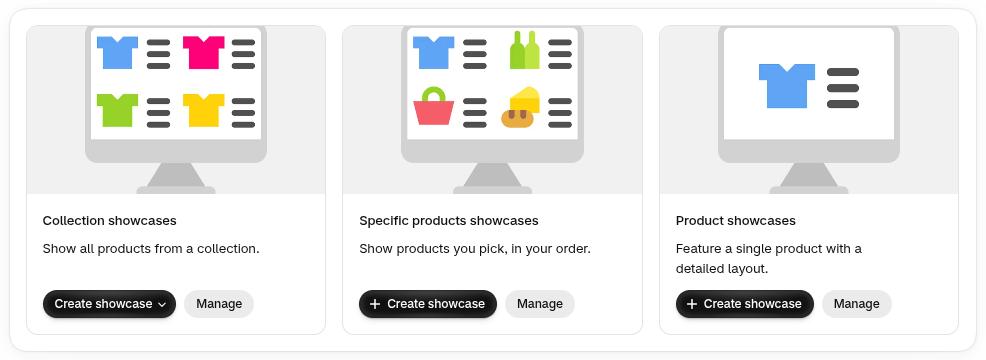
Everything starts with a showcase. Pick the type that matches what you want to promote:
- Collection showcases display all products from a collection. When you add new products to that collection, the showcase updates automatically.
- Specific products showcases display only the products you hand-pick, in the exact order you choose. Perfect for "Top 5 gift ideas" or "Shop the look" content.
- Product showcases feature a single product with a detailed layout, ideal for product reviews, launches and landing pages.
Need something fast? Use Quick code to generate an embed code instantly without saving a showcase, or Create and save to keep it for later edits.
2. Embed your products anywhere, even outside Shopify
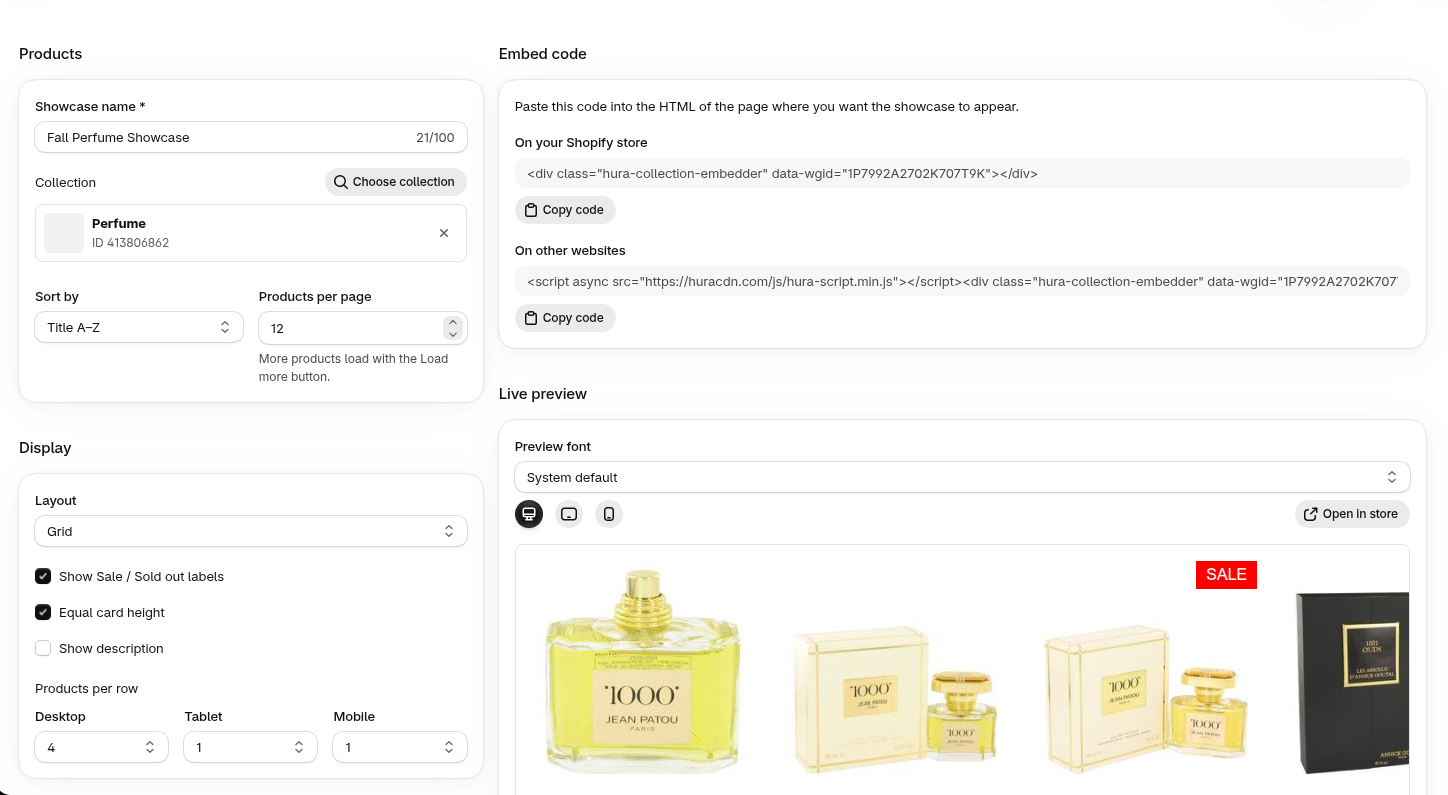
Each showcase comes with two embed codes:
- On your Shopify store: a single line of HTML you paste into a page, a blog post, a product description or a custom section.
- On other websites: the same showcase plus a lightweight, asynchronously loaded script, so it works on WordPress, Blogger, Joomla, Drupal or any site where you can add HTML.
This is the heart of the app. Your blog, your partner's website, your affiliate pages and your landing pages can all show live products with up-to-date prices, sale badges and stock status, and every click leads back to your Shopify store.
3. Four layouts: Grid, List, Slider and Order form
Choose the layout that fits the space and the goal:
- Grid: the classic product grid. Set how many products per row on desktop, tablet and mobile.
- List: products stacked with more room for details, great inside long-form articles.
- Slider: a swipeable carousel that saves space and keeps visitors engaged.
- Order form: a quick bulk-order list, ideal for wholesale buyers and repeat customers who know what they want.
Here is a collection showcase in Grid layout, live on a storefront page. Sale labels and compare-at prices are pulled automatically from Shopify:

And the same idea in Slider layout, with navigation arrows:

4. Full design control with a live preview
Your showcase should look like it belongs on your site. Hura Product Showcase Builder gives you detailed styling options without writing a single line of CSS:
- Sorting and paging: choose the sort order (title, best selling and more); set products per page with a customizable Load more button.
- Display options: show Sale and Sold out labels, equal card height, product description and vendor.
- Product card: card style, hover effect and border.
- Typography: bold, italic, underline, uppercase, alignment, color and font size for both the product title and the price.
- Live preview: switch between desktop, tablet and mobile, test different fonts, then click Open in store to see the real result.
5. Add to cart and campaign tracking (UTM)
Turn any showcase into a shopping experience by enabling the Add to cart button, so readers can buy without hunting for the product page. You can also add UTM parameters to every product link and see exactly which blog post, partner site or campaign is driving traffic and sales in your analytics tool.
6. Minishop: a complete store you can put on any web page
Minishop takes the idea further. It is a full mini storefront, with product grid, quick view, cart and checkout, that you embed with a single code on any website. It is the easiest way to sell on a WordPress blog, a portfolio, a link-in-bio page or a partner's site without building a second store.

What a Minishop includes:
- Products from a collection, with sorting, reverse order and pagination.
- Layout and card design: products per row for each device, spacing, background, border, corner radius, shadow, hover zoom, image ratio and image fit.
- Quick view: when a shopper clicks a product, a pop-up shows the vendor, description, variant picker, Add to cart and Buy now buttons, all with your own text and colors.
- Floating cart: a cart button that follows the visitor, with position, size, colors and a badge you control.
- Discount codes: shoppers can apply discounts right in the cart.
- Markets: show prices and product details for a specific country and language.

7. Direct checkout links and QR codes
Sometimes the fastest path to a sale is to skip browsing entirely. With Checkout links you create a short, branded link that adds the products you choose, in the quantities you choose, straight into the customer's cart.
- Pick a custom link address on your own store domain.
- Add one or more products with preset quantities.
- Auto-apply a discount code at checkout.
- Attach an order note to track where the order came from.
- Use Preview cart to test the link before sharing it.

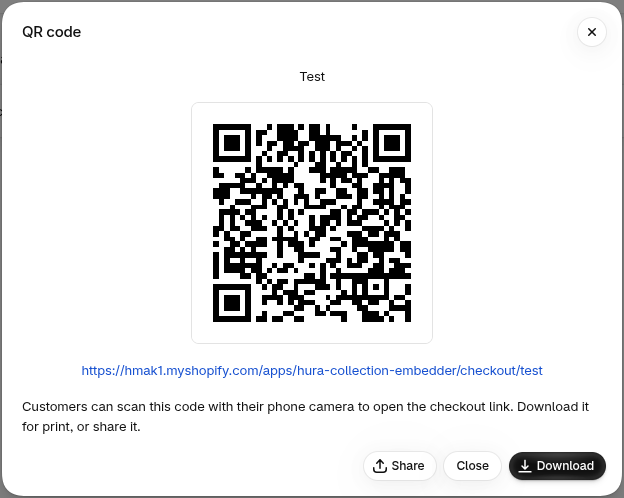
Every checkout link also gets a QR code that you can download or share. Print it on packaging, flyers, posters, menus or event booths, and shoppers can buy with one scan from their phone.
Checkout links work beautifully in Instagram and TikTok bios, email and SMS campaigns, influencer collaborations, live-stream selling and customer support chats.
8. 11 theme sections for Online Store 2.0, no code needed
Want to upgrade your own storefront too? The app includes a library of sections that you add to any Online Store 2.0 theme from the theme editor. Each section is customizable and optimized for speed.
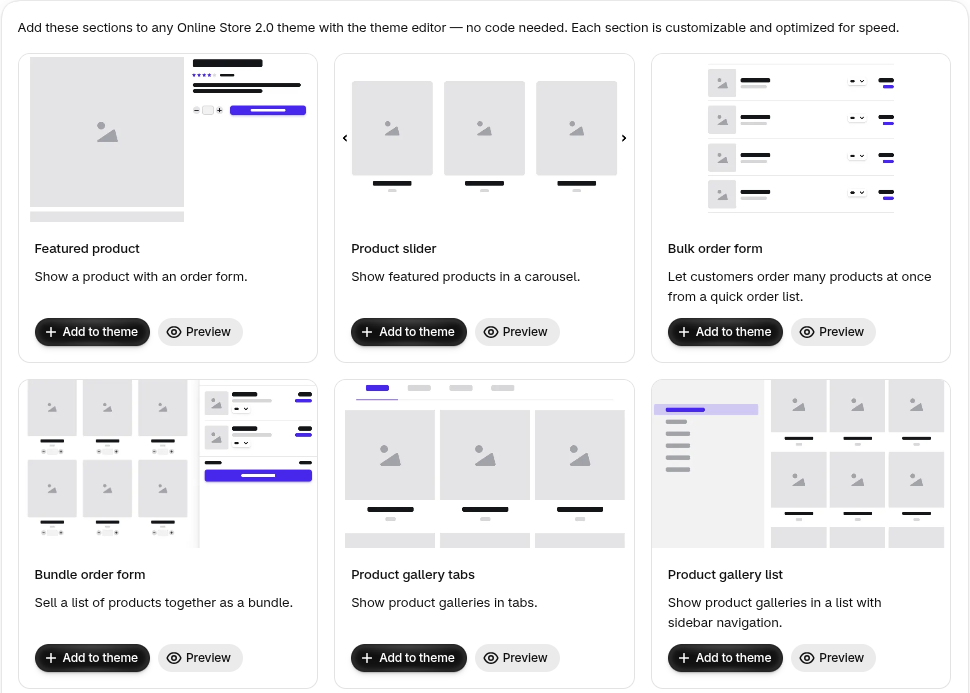
- Featured product: show a product with an order form.
- Product slider: feature products in a carousel.
- Bulk order form: let customers order many products at once from a quick order list.
- Bundle order form: sell a list of products together as a bundle.
- Product gallery tabs and Product gallery list: organize product galleries in tabs or with sidebar navigation.
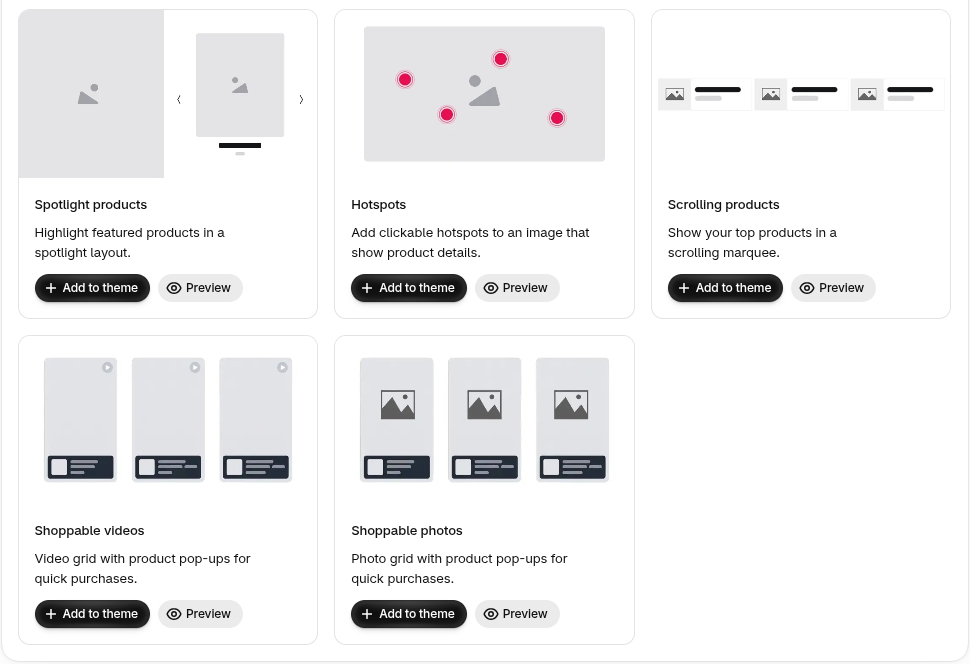
- Spotlight products: highlight featured products in a spotlight layout.
- Hotspots: add clickable hotspots to a lifestyle image that reveal product details.
- Scrolling products: show your top products in a scrolling marquee.
- Shoppable videos and Shoppable photos: video and photo grids with product pop-ups for quick purchases.
9. Built-in analytics for every showcase
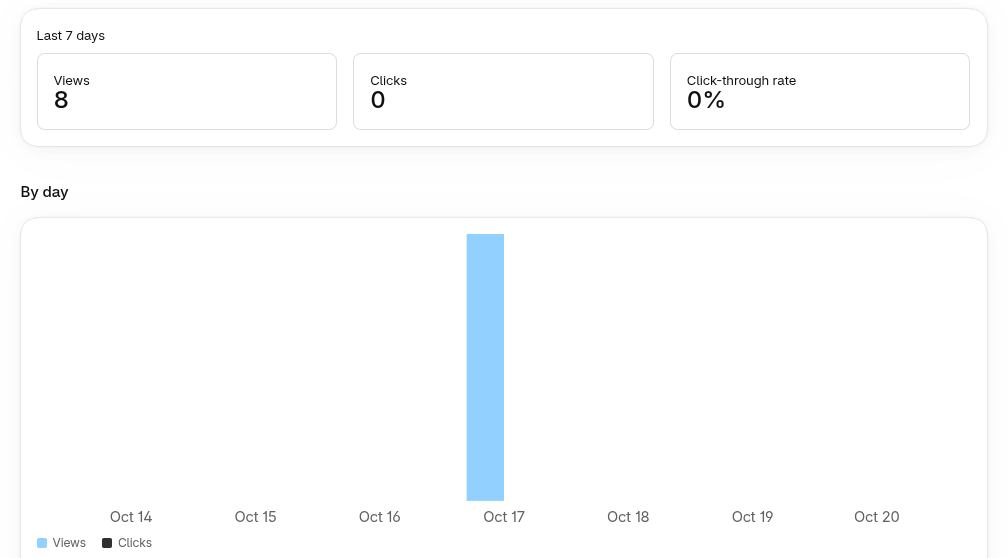
Know what works. Each showcase has its own analytics page with views, clicks and click-through rate, a by-day chart, the top countries your visitors come from and an activity history. Use it to find your best-performing placements and double down on them.
10. AI tools that create content from your products
Showcases need traffic, and traffic needs content. The built-in AI tools help you produce it in minutes:
- Blog post generator: write SEO-friendly blog posts that feature your products, ready to pair with a showcase.
- TikTok carousel creator: turn a product into a ready-to-post TikTok photo carousel.
- Instagram post generator: create Instagram carousel images and captions from a product.

Paid plans include free monthly AI credits, and you can buy extra credits whenever you need them.
Made to be easy
- No coding required: build visually, copy one code, paste it.
- Works with any theme and is compatible with all modern browsers and mobile devices.
- Fast: the embed script loads asynchronously, so it will not slow down your pages.
- Multilingual app interface: English, Spanish, Italian, Japanese, Vietnamese, French, German, Dutch, Portuguese (Brazil) and Chinese (Simplified).
- Friendly support from the Hura Apps team.
Who is it for?
- Content-driven brands that want every blog post to sell, not just inform.
- Merchants with a WordPress or other website who want to sell Shopify products there without migrating.
- Social sellers and influencer campaigns that need one-tap checkout links and QR codes.
- Wholesale and B2B stores that benefit from order forms and bulk ordering.
- Any store owner who wants richer product sections on their homepage, landing pages and product pages.
Pricing
You can start for free and upgrade as you grow:
| Plan | Price | Highlights |
|---|---|---|
| Free | $0 | 1 showcase of each type, Collection and Specific products, display on other platforms, Grid/List, Slider and Bulk order layouts |
| Starter | $1.49/month | Everything in Free, 5 showcases of each type, remove brandmark, theme sections, 5 direct checkout links |
| Pro | $4.99/month | Everything in Starter, 20 showcases of each type, 20 direct checkout links, 10 free AI credits per month |
| Premium | $9.99/month | Everything in Pro, unlimited showcases and checkout links, analytics, 50 free AI credits per month |
Prices are billed in USD by Shopify. Check the app listing for the latest plan details.
Get started in 3 steps
- Install Hura Product Showcase Builder from the Shopify App Store.
- Create a showcase, Minishop or checkout link and style it with the live preview.
- Copy the code and paste it into your Shopify page, blog post or any other website, or share your checkout link and QR code.
Frequently asked questions
Can I show my Shopify products on a WordPress site?
Yes. Use the "On other websites" embed code for showcases, or embed a Minishop to give visitors a full cart and checkout experience.
Will prices and stock update automatically?
Yes. Showcases read your products directly from Shopify, so prices, sale badges and sold-out status stay in sync.
Do I need to edit my theme code?
No. Paste the embed code into any page or blog post, or add the theme sections from the theme editor.
Is there a free plan?
Yes. The Free plan lets you create showcases and display them on other platforms at no cost.
Start selling everywhere today
Every page that mentions your products should be able to sell them. With Hura Product Showcase Builder, your products appear wherever your customers are, on your blog, your partners' sites, social media and even in print, with a clear path to checkout. More places to discover your products means more chances to sell.